

Whether you are meeting with a business partner or have an outstanding pitch to present to a board, a smooth connection, clear video and audio can go a long way when establishing a more personal connection in your meeting. It’s apparent that video conferencing is not going anywhere any time soon, so let’s discuss how to create the most professional, high quality technology setup for your virtual meetings.
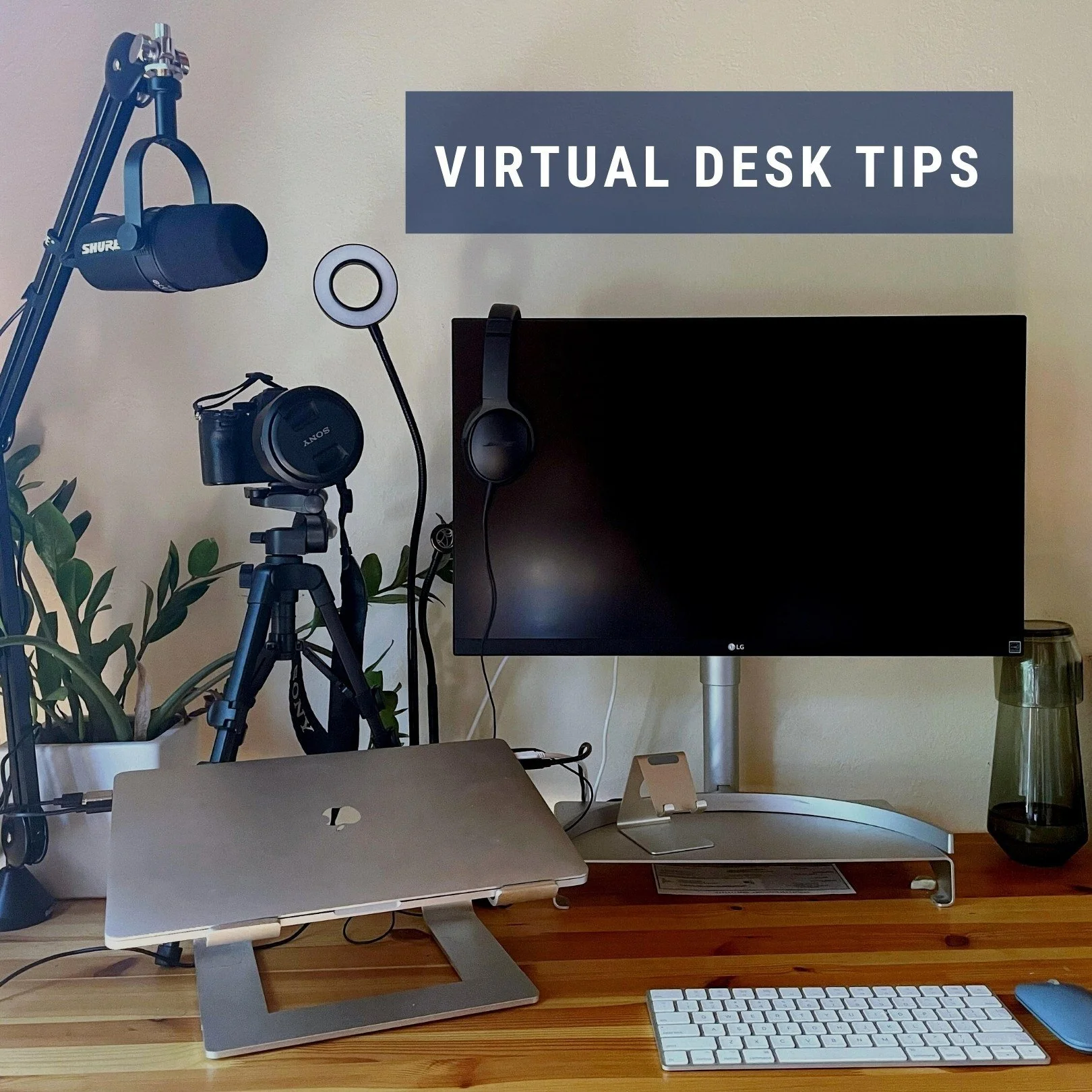
Here’s what we are using at Adventure Architects in order to give our meetings and activities the highest quality and to ensure things run smoothly:
*We have linked items for ease but do not receive any compensation from any company in exchange
Web camera: affordable: Logitech C920s Pro HD Webcam upgrade: A7Riii or other digital camera
Sure, your computer comes with a built-in camera. However, a web camera upgrade is a game changer in the video conferencing and virtual events world. Your image will come through looking crisp and high-definition, drawing attention towards you. Additionally, an external web camera can be pointed in any direction, which is helpful if you have multiple monitors that you will be looking at. If you have a digital camera laying around you can often connect these to your computer as well. founder Carina Hessmer, for example, has set up her Sony A7R iii as her webcam, and the resulting resolution is impressive. Here is a link to a blog that shares more info on how to make your camera your webcam.
Ring light: affordable: UBeesize Ring Light upgrade: Lume Cube (Carina just purchased this and has been thrilled with its elegance, functionality and ability to also act as a great desk lamp for reading or reviewing paper documents
A ring light evenly distributes light on your face, eliminating shadows and makes your image pop. Having a clear view of your face is important when making connections with people online.
Green screen: Yescom Retractable Green Screen Backdrop Chromakey Wall Ceiling Mountable Pull Down
At Adventure Architects, we lead virtual experiences designed to remove participants from their offices and transport them inside a story. On a given call, our backgrounds may feature the icy landscape of Antarctica, a serene Japanese forest, or a number of other settings. Note: We used to own one that came with a tripod and folded up, but most of us got annoyed with setting it up and taking it down that we no longer use it.
Microphone: MV7 Podcast Microphone with a Swivel Microphone Boom
An external microphone can drastically improve the way you lead a virtual meeting. The clear audio makes the listening experience for others effortless, making people feel less removed from the conversation.
Uninterrupted power supply: EcoFlow Delta Powerstation and CyberPower CP1350AVRLCD UPS (The cyberpower held up well during a recent caving expedition for National Geographic and now supplies uninterrupted power supply at Carina’s home office)
If you’re in locations with an unstable power grid (think California in the height of summer during fires or winter storms that take out the power lines), having a power supply will help keep your devices, hotspot or wifi running smoothly for your important meetings.
Headphones: AirPod pros with noise cancellation and Bose QuietComfort 35 over ear headphones (Note that while the Airpod pros are very popular their battery life does diminish after a year + of use, while we have found the BoseComfort 35 to be a true workhorse.)
Whether or not your office space is in a noisy area with distractions, these headphones will help you focus on the audio from a meeting. They also minimize feedback issues that may come from your own audio when on a video call. These are both also popular for business travel on loud planes.
Laptop, Large Monitor, Laptop Stand & Monitor Riser
Monitors and risers for your laptop and monitor improve posture when working on the computer, and allow your laptop to cool quickly.
Most of our team uses a suped up 16-inch MacBook Pro to handle the diversity of projects we manage.
The centerpiece of your technology setup is your laptop and monitors. Having a large monitor as well as your central laptop screen is essential. During video conference calls it is very helpful to have one screen to view the people on a call, and the other screen for taking notes or viewing relevant material.
Standing Desk: UPLIFT Standing Desk (V2 & V2-Commercial) & their motion board
While a standing desk alone has not been proven to be better for health, having a desk that allows you to change positions throughout the day has. Carina recently purchased the Uplift standing desk which allows her to switch between standing and sitting. Attending meetings whilst standing can create a more powerful attitude while presenting. While we wouldn’t recommend the motion board for meetings where you want to be in a powerpose, we did want to mention it as a great healthy addition to the standing desk to ensure continuous movement (important to overall health) whilst standing.
Improving your space with one or all of these game-changers will leave only the best impressions on your meeting participants. Best of luck in your future video conferencing endeavors and let us know if you have any questions.
Contact us here to book or design your own team building experience!